When you begin working on Amazon it can feel like learning a new language. What is an ASIN number? What does your CDQ score tell you? Here’s our quick guide to the key Amazon terms that you need to know to manage your product listings.
ASIN
ASIN, meaning Amazon Standard Identification Number. The unique, ten-character code that Amazon gives to a particular product in a particular form. It is Amazon’s own barcode system, used to organise and track its millions of products. One product, with its one ASIN, may be sold by any number of Vendors or Sellers, but the shopper should always receive the same item. The word ASIN is often used to mean simply “product”, in the way that the term SKU is used elsewhere. On Amazon, though, SKU means something different.
Title
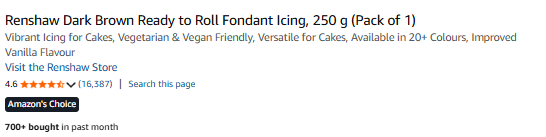
Item Highlights
Short descriptions (125 characters) that explain a product’s main features and uses. They help shoppers understand the product and they help Amazon understand what it is and when to recommend it. They are shown in grey underneath the title (see above).
Bullets
Product Description
Keywords
Attributes
The specific details that describe a product, such as its brand, size, colour, material and weight. Unlike a written description, these are chosen from set options, and they are shown as part of the listing.
A9
Amazon’s search system. It decides where products appear in search results, weighing things such as how well a listing matches the words searched for, its sales history, its stock, its price, the quality of the listing, its reviews, and how often it leads to a sale.
SEO
Search Engine Optimisation. The work of preparing a listing, with the right keywords, accurate details and good content, so that it shows up higher in Amazon’s search results and is seen by more shoppers.
Leaf Node
The smallest category a product sits in, at the end of Amazon’s chain of categories. For example: Grocery, then Drinks, then Tea, then Fruit and Herbal Tea, then Herbal Tea. Here, Herbal Tea is the leaf node.
Product Detail Page
(also Item Detail Page) The single Amazon page where a shopper can see all the information about a product.
Main Image
The first and most important picture of your product. It is the one shown in search results and at the front of the image carousel. Amazon has strict rules for it: it must have a plain white background and show only the product itself.
Secondary Image
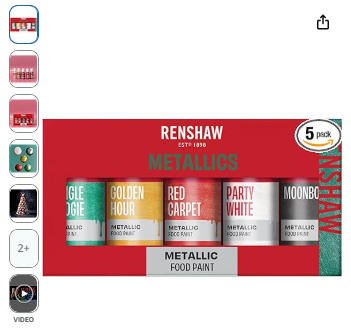
Any further picture after the main one. These are used to show the product from other angles, in a setting, or with added information, so that the shopper understands it more fully.
Listing Video
A short video within the image carousel that shows the product in use and points out its main features, giving the shopper more than pictures alone can.
Image Carousel
The set of pictures, and any video, that a shopper can swipe or scroll through on the listing, one after another, to see the product from different angles, in different settings, or with added information.
Back of Pack Image
A photograph of the back of the product’s packaging. It typically shows the detailed information found there, such as ingredients, nutrition, instructions, warnings and any legal wording.
Variation
A way of combining several different versions of a product, such as different sizes, colours or styles, all gathered on one listing rather than spread across separate ones. The individual ASINs sit under a parent ASIN meaning they show as a group.
A+ Content
A section of the listing, for brands in Brand Registry, that allows richer descriptions with pictures and graphics built into the page. It usually appears under the heading “From the Manufacturer”. It was once known as Enhanced Brand Content, and the two names are still used to mean the same thing.
IDQ
Item Detail Quality. A score Amazon uses to measure how complete and accurate the information on each ASIN number is. A higher score helps a product show up better in search and gives the shopper a better experience.
CDQ
Composite Data Quality. A newer, fuller version of IDQ. It is a score for how complete and accurate everything on a listing is, taking in the images, the title, the variations, the A+ Content and more. Amazon uses it to suggest what to improve.
Brand Story
A section on the listing, shown as a scrolling banner below the product description, where a brand can tell the shopper more about itself, its history, its values and what it sets out to do.
Brand Store
A free, multi-page site of a brand’s own within Amazon, where it can show its whole range, tell its story, and give shoppers a more tailored way to browse.
EBC
Enhanced Brand Content. An older name for A+ Content used in Seller Central. It is the section of a listing, for brands in Brand Registry, that allows richer descriptions with pictures and graphics.
EMC
Enhanced Marketing Content. An older name for A+ Content used in Vendor Central. It is the same thing as EBC.
Brand Byline
The brand’s name shown just beneath the product title on a listing, which a shopper can click to reach the brand’s store or its other products. Sometimes called just the “byline” (see image above)
NIS
New Item Setup. The MinsterFB process of taking a client’s new product details, such as barcodes, configuration and pricing, loading them into Amazon through a New Line Form, and then improving the listing with images, A+ Content, a Brand Story and a Brand Store.
NLF
New Line Form. The spreadsheet that Sellers and Vendors send to Amazon to ask for a new product listing. It gives Amazon all the product details it needs, such as the title, description, images, price and size, meaning Amazon can set up a new ASIN.
Buy Box
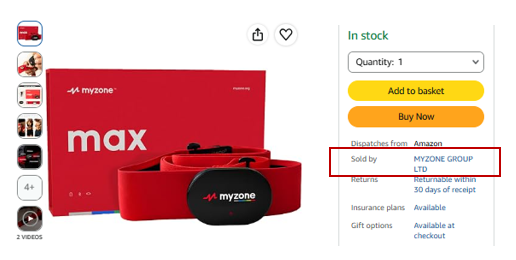
The buy box is the offer Amazon shows first on a product page. Amazon’s system chooses the Seller with the best combination of a low price and good delivery. Also called the Featured Offer. In the example below Myzone have the buy box but the product will be dispatched by Amazon.
To learn more…
To learn more about how MinsterFB can manage your listings for you, click here.