This article provides a summary of the announcements at unBoxed which work across both Amazon DSP and Sponsored Ads, ie full funnel advertising initiatives. There were a number of platform and reporting announcements that will change workflows and best practice going forwards as well as improving the results that you can achieve when running a full funnel campaign. The key announcements were:
- Unified Full Funnel Reporting
- Amazon Marketing Cloud (AMC) Agent
- Full Funnel Advertising
- Fixed Price Share of Voice ‘Reserved ‘ Ads
Specific Sponsored Ads announcements and DSP announcements are covered in separate blogs (follow the links).
Unified Full funnel Reporting
The new unified reporting experience consolidates campaign performance across Sponsored Ads and DSP. This gives a full funnel picture of Amazon advertising performance. It covers different accounts, dimensions, and ad products. You can use the new report builder to access comprehensive cross-channel reporting including standardized metrics between DSP and SP Ads. It’s also possible to review enhanced historical insights, enabling you to make more informed advertising decisions.

This reporting enhancement is already live on the Ad Console, and includes longer lookback periods:
- 14 days worth of hourly reporting
- 15 months worth of daily and weekly reporting
- 6 years worth of monthly reporting
This data expansion alone is very useful. However, there’s much more.
You can use standard reports – these are available for Campaign analysis, Inventory analysis or Audience analysis. Alternatively, you can fully customise your reports, treating the data like a giant pivot table and making your own selections. All reports can be set up as a once-only or recurring report. They will then arrive in your e-mail inbox.
The new reporting harmonises the language between DSP and Sponsored Ads. For those of us working between the two, it has long been a source of frustration that in Sponsored Ads you would look at Clicks but in DSP you report on Click-throughs. Other harmonisations include:
- Orders in DSP are ‘Campaigns’ in the new reporting
- Line Items in DSP are ‘Ad Groups’
- Creatives in DSP are now ‘Ads’
- In DSP, Total Purchases (ie purchases including brand halo) are now Purchases ie the default will be to measure purchase at brand halo level
- Purchases for the specific promoted products are named ‘Purchases (promoted)’
Presently, the new naming is only in place on the reporting tab and not in the DSP console itself. However, we are seeing rapid changes on the console so this could change at any time.
There are some wonderful additions to the advertising metrics available, and some disappointments. On the plus side, there are new metrics such as
- Long term ROAS (The projected sales for the next 12 months from incremental new-to-brand customer engagement driven by your campaign). This is also available directly in the Sponsored Ads and DSP consoles
- Inventory (Supply Source) reporting – Whilst this reporting is standard in Amazon’s DSP, we haven’t previously been able to distinguish between onsite and offsite placements for Sponsored Display. This new reporting has been very helpful in interpreting some of the results we’ve seen from this ad type.
- Placement reporting – again, it wasn’t previously straightforward to see where Sponsored Ads were serving. You could view Sponsored Product ads by placement through the placement upweights screen, but there’s no equivalent for Sponsored Brands.
Disappointingly, whilst it’s good to be able to pull viewability data in combination with other data sets, it’s a shame that there isn’t any viewability data for Sponsored Product or Sponsored Display vCPM ads. It would have been good to be able to compare one ad type with another on that metric. The same is broadly true across the board. If a metric wasn’t available for a particular ad type, then it still isn’t available in the integrated reporting. However the time saved in creating Amazon full funnel advertising reporting makes it much quicker to use the metrics that ARE available on all ad types.
Amazon Marketing Cloud (AMC) Agent
Amazon Marketing Cloud (AMC) is a data tool that enables data and audience integration between Amazon’s DSP and Sponsored Ads. Learn more here. The AMC Agent is an AI tool in AWS that enables natural language conversations with AMC. The idea is that this will make it quicker and easier to generate insights, make the analytics more accessible and empower users to get more out of AMC.
There are 3 key elements:
- Analytics SQL generator – The questions posed to the AMC Agent in the demo video were reasonably vague (eg Write a query that demonstrates sales impact of our cross-channel campaigns by customer segment). The agent explains its response to the question and how the analysis will be done. This means, so it isn’t too ‘black box’. You still have to copy the SQL into the query editor and run it manually. Interestingly that means there’s no AI interpretation of those results.
- Audience SQL generator – The example audience prompt given in the demo video was – “Create an audience of customers who have viewed our product pages and seen our streaming TV ads but haven’t purchased in the last 30 days”. Again, you will need to copy the SQL into the audience generator and run it to create the audience.
- Integrated product support, which “Streamlines product learning with instant access to AMC documentation and support for commonly asked questions”. This feature provides best practices, capabilities and technical documentation. It’s essentially an AI help bot. An example question in the demo video was “What’s the difference between rule-based and lookalike audiences”
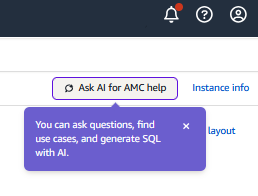
The AMC Agent is already available. When you next log into your account and you will see this:
Full Funel Advertising
This looks to be a bit further off. The intention appears to be that the new system will comprise 3 elements:
- Intelligent setup and management
- Simplified User experience
- Flexible, full-funnel reporting
Some elements of this seem like a re-packing of things announced elsewhere, such as the single global account, global billing and payments etc. However, it appears there will be a specific Full Funnel Campaign available. This will enable all advertisers to access placements previously only available via the DSP console in a simplified way.
The Full Funnel Campaign will be available as a new campaign type. After entering:
- Brand and category
- Assets
- Budget
The Ad Agent then provides:
- Creatives
- Placements
- Audiences
- Measurement
And then builds it for you. There’s also a version of this where you provide the AI assistant with a media plan that you would like to deliver.
This new ad type will share signals across the shopper journey and will automatically re-target shoppers without the need for AMC audiences. Shoppers will be added to remarketing audiences within 15 minutes. The system can also automatically apply top-performing keywords to other campaigns.
Amazon describes these ads as ‘transparent box’ rather than ‘black box’ advertising and asserts that it will be clear what money is being spent where and delivering what results. However, what is less clear is how the optimisations will work and whether they will be equally transparent.
Fixed Price Share of Voice ‘Reserved ‘ Ads
This new form of Amazon Advertising package is Full Funnel in that it includes ad placements previously unavailable via the Sponsored Ads console.
The principle is that advertisers will be able to secure a specific share of voice for a specific placement for a fixed fee.
The first of these is the Sponsored Brand Reserved Share of Voice ad, which enables advertisers to reserve 95% of the top-of-search placements for between 5 and 1000 keywords of your choice. All these keywords must include your brand, which must be included in Brand Registry. The package is not available for category or competitor keywords. You then get a quote for your specified time period (between 30 and 92 days). Each keyword can only be included in one SOV reserved ad. If you choose to go ahead, you pay the fixed fee and enjoy the certainty that you are dominating those keywords. This feature is already available. Early results suggest that, whilst impressions and clicks may be lower than what might have been expected, a careful choice of keywords and timing can provide a much lower cost per click than would have been achievable otherwise.

There are 3 further Reserved Share of Voice ad types:
- Homepage Hero
- Product Spotlight
- Brand Showcase
Homepage Hero guarantees a share of voice on the Amazon Store home page. Packages are flexible, enabling you to choose relevant audience segments and the audience share you would like to secure for a quoted fixed price. Homepage Hero will be available in most markets.
Product Spotlight enables brands to buy up to 100% share of voice for high-visibility display placements on pages showing their brand’s products. This feature will only be available in the US.
Brand Showcase is a premium reserved share of voice package that allows brands to transform their product detail pages into immersive brand destinations with custom brand storytelling. This functionality goes far beyond the A+, Brand Story and Shoppable Collections options usually available. However, this option will also only be available in the US.
All these reserved share of voice ad formats are worthy of experimentation. However, this is the first time that home-page placements have been available so straight-forwardly.
Further Information
To view all the presentations at unBoxed, register here and watch them back at your leisure. Alternatively, here are links to our other summaries of the key focus areas:
- Amazon Creative Studio
- Sponsored Ads announcements from Amazon unBoxed
- DSP announcements from Amazon unBoxed