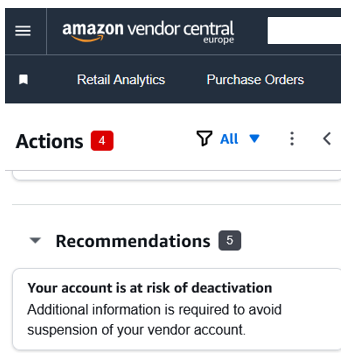
If your Amazon Vendor Central page is showing this ‘risk of deactivation’ message then you need to begin Vendor verification. Vendor verification is also known by Amazon as Global Vendor Identity Verification.
From the first date that this notification appears you have just 60 days to complete Amazon Vendor Verification before your account is suspended. The actions need to happen quickly!
This process is similar to the Seller ‘Know Your Customer’ verification process that you will be familiar with if you have ever opened a new Seller account.
Global Vendor Identity Verification requires two sets of information:
- Information about the business that owns the account
- Information about the individual entering the data
This process can only be completed either by a legal representative of the business or someone who has a letter of authorisation from a legal representative. A legal representative is someone who is listed on Companies house eg an owner or director.
The Global Vendor identity verification Process
The process itself is relatively simple. Click on the notification in Vendor Central to begin. Firstly you upload the required information. Amazon will then take up to 5 days to verify the information and finally they will advise you of their decision. The process for challenging a decision to suspend your account isn’t yet clear, so we strongly recommend compiling all the information listed below and making all the checks suggested in the Further Guidance section before you begin.
Information Required for Amazon vendor Verification
The first 2 pieces of information cannot be changed later, so double-check to ensure that they are correct first time. The full list of information required is as follows:
- Business Location
- Business Type (choose from Privately Owned business, Publicly Listed business, State-Owned business, Sole Proprietor or Charity)
- Business Name
- Company Registration Number
- Registered Business Address (this must be the address that represents your primary place of business eg head office or branch, where you receive services from Amazon, and for individuals, this represents your usual place of residence. Your registered business address will be displayed on your public seller profile page)
- Primary contact name, including middle name
- Primary contact country of citizenship
- Primary contact country of birth
- Primary contact date of birth
- Primary Contact Identity proof (Passport of driving license)
- Number for identity document (eg passport number)
- Identity Proof date of expiry
- Primary Contact residential address
- Primary Contact phone number for verification (Amazon will use this to send you a PIN)
- Language (for SMS)
- Primary Contact residential address proof type
Documents required
Before you begin the process, make sure that you have the following documents to hand:
- Registration Extract
- Proof of registration address (Electricity Bill, Gas Bill, Internet Bill, Telephone Bill, TV bill, Water Bill, Rent Receipt or Bank Account statement) issued in the last 180 days
- Primary contact residential address proof (Electricity Bill, Gas Bill, Internet Bill, Telephone Bill, TV bill, Water Bill, Rent Receipt or Bank Account statement)
- Primary Contact government-issued identity document (eg driving license or passport)
Further Guidance for Amazon Vendor Verification
The most important thing to bear in mind is that for UK businesses, all the information that you submit MUST be the same as the information recorded at Companies House. This includes the Business Type, address and company registration number. All documents must be valid ie not expire, revoked, inactive or closed. They must be authentic and unaltered.
If Amazon are unable to verify your information, they will request that you resubmit your documents within 14 days. If you do not meet this deadline, Amazon may close your account.
The Verification system will provide FAQs to the right-hand side of the screen throughout the process. If you are in any doubt, review the information there before submitting your answers. There is also a help section within the Help/Account Management section.
Conclusion
There is no ned to undertake Amazon Vendor Verification unless you receive a notification requiring you to do so on Vendor Central. From the day that you receive the notification, you have 60 days to complete the process. Failure to met the deadline for your Global Vendor Identity Verification could result in suspension of your account.